
Register a new user account
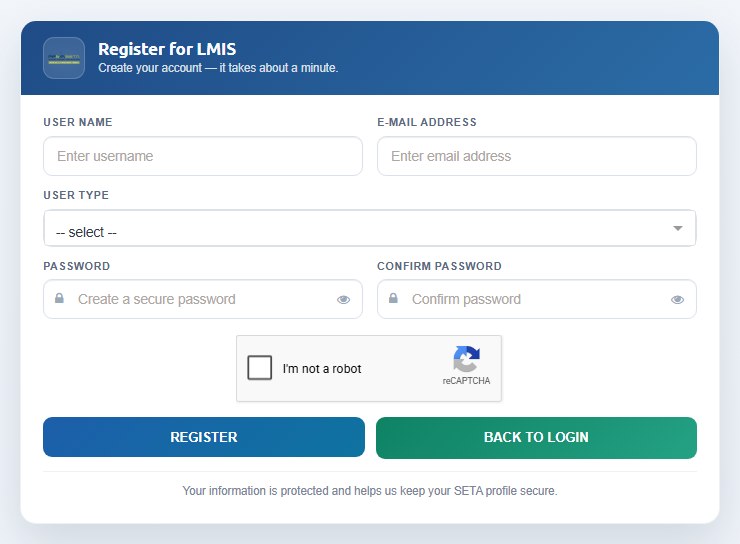
Create your LMIS account with the Register for LMIS form.
You must register on LMIS before you can use any module. Registration is required to submit a WSP/ATR, apply for discretionary grant funding, apply for accreditation as a training provider, register as an assessor, moderator or facilitator, and capture learners with their supporting documents.
- On the home page click Register (or click Register on the Login page). The Register for LMIS form opens.
- Enter a User Name. Choose something you will remember — you type it every time you log in.
- Enter your E-mail Address. The activation e-mail is sent here, so it must be a mailbox you can open.
- Select your User Type (see Which user type should I register as?). You can type in the list to filter it.
- Enter a Password and repeat it in Confirm Password. Use the eye icon to show or hide what you typed.
- Tick the I'm not a robot reCAPTCHA box and complete any picture challenge.
- Click Register. A confirmation message tells you that your profile has been registered and that you should check your mailbox.
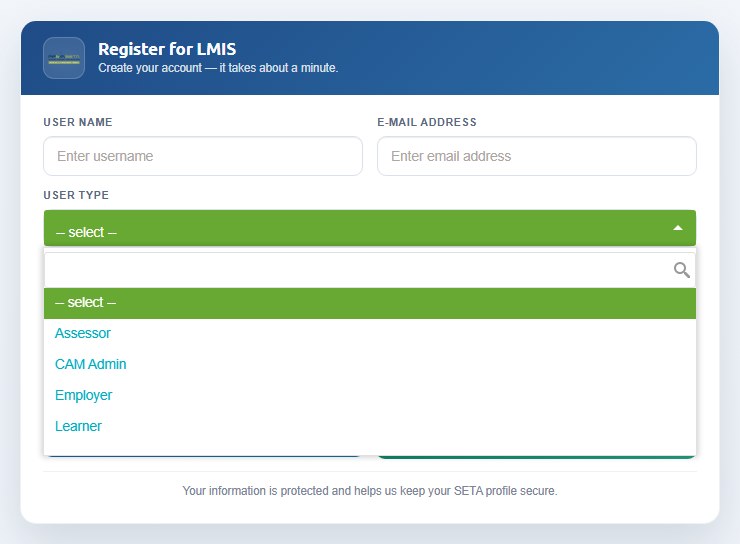
Training providers: if your organisation is not yet accredited with the FP&M SETA, select Training Provider and tick New Provider — the provider field is set to Unknown (0) until your accreditation application creates the provider record. If your organisation is already accredited, leave New Provider unticked and start typing the provider's name so that you can select it and link your account to the existing provider.
Passwords must be strong: at least eight characters with upper- and lower-case letters, a number and a symbol. Your username and e-mail address must be unique on LMIS — if either is already in use you will be asked to choose another or to log in instead.