
Artisans — trade registrations and trade tests
The artisan register, trade registrations, trade test results and serial numbers, and BIWA and SDP classes.
The artisan register
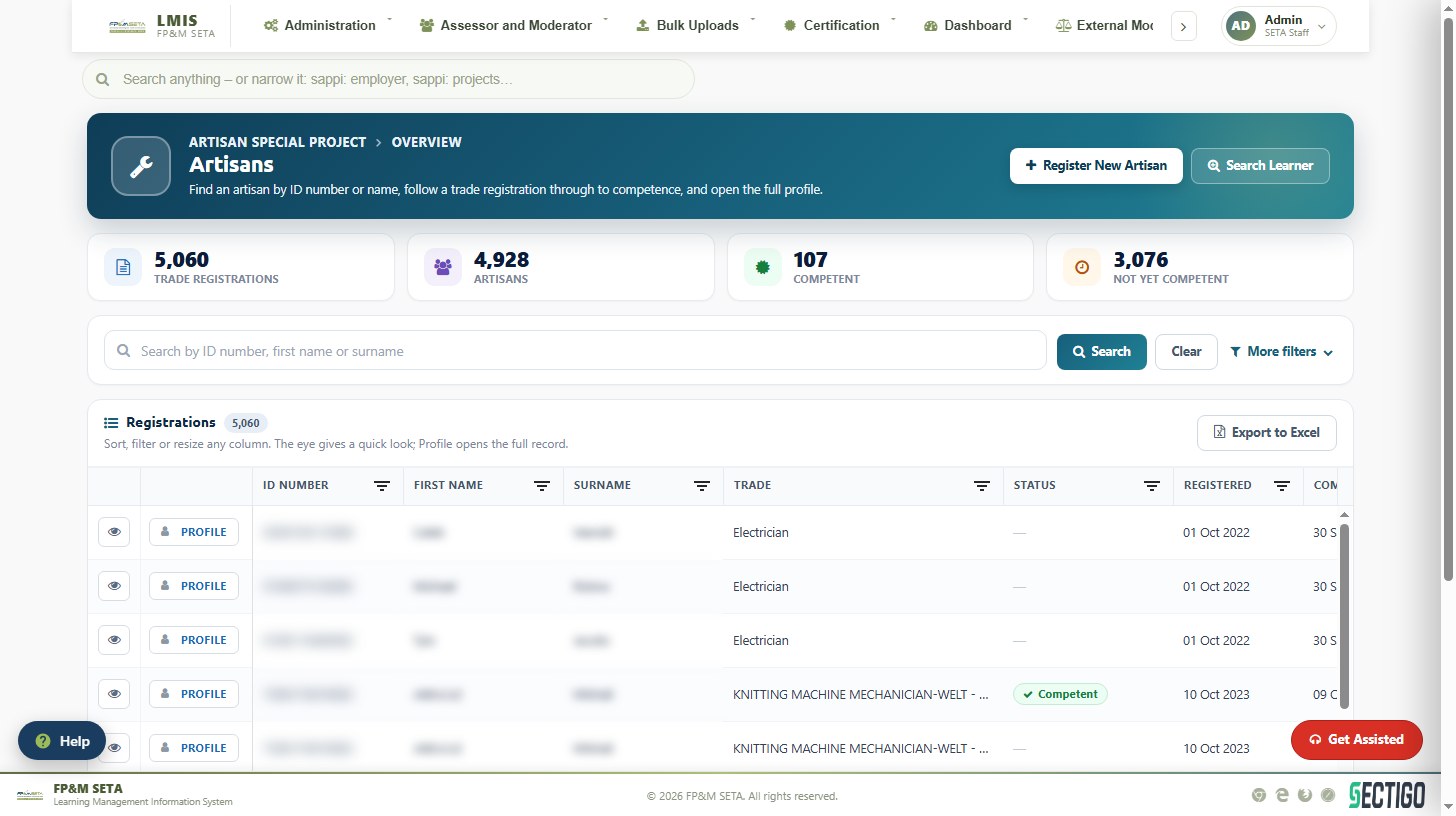
Artisans lists every trade registration, with cards for Trade registrations, Artisans, Competent and Not yet competent.
- Type an ID number, first name or surname in the search box and click Search (Clear resets). A number searches by ID; text searches names.
- More filters adds Trade, Trade test centre, Training provider and Employer. Type three or more letters and pick from the list.
- The eye icon on a row gives a quick look at the artisan; Profile opens the full record.
- Export to Excel downloads what is currently filtered.
- Register New Artisan opens a blank artisan profile; Search Learner finds a learner already on LMIS first.
An artisan's profile
The profile has three tabs: Learner (personal details), Trade Registrations and Trade Documents (where documents are Verify-ed, marked Remediation Required or Remediate-d).
Add or edit a trade registration
On Trade Registrations click Add trade registration, or Edit on a row. The popup has one box per field:
- Trade — choose the trade; the OFO occupation follows from it.
- Where — type the Employer SDL number (the employer fills in), choose the Training provider and the Trade test centre.
- Registration — the Registration date sets the estimated completion date three years later; change it if needed. Switch on SETA funded and give the DG reference no., or leave it off and give the workplace approval number. Switch on Competent when the artisan is found competent.
- Assessed by — appears once Competent is on: the assessor and moderator.
- Save registration (or Save changes).
Once the learner is certificated the registration is locked and opens read-only.
Record a trade test
Click Trade Test on the registration, then Add Trade Test Result (or Edit on an attempt):
- Trade test centre — only centres accredited for the trade are offered.
- Test date, Test no. (attempt 1 to 3) and Result.
- Assessed by — the assessor and moderator, limited to those linked to the centre for that trade.
- Save trade test. Once saved, attach the Trade test results document for that attempt (PDF, Word or image, up to 20 MB); Replace and Remove change it.
The Test serial no. is allocated by the SETA — see Trade test centres.
BIWA and SDP classes
BIWA records classes and enrolments for bursaries, TVET and university placements, internships and AET (tabs for each), with cards for classes, learners in training, achieved and overdue classes. Create New Class adds one (SETA funded or industry funded); View, Edit, Enrol Class and Site Visit work on a class.
Non BIWA is now SDP Classes: classes for learnerships, apprenticeships, skills programmes, RPL, ARPL and non-pivotal programmes.